AI Essentials for Dental Practice Owners
AI is only as good as the context you give it.Most people have never given it any.
Most dentists are already using AI. A quick question to ChatGPT, a draft email, a summary of something they didn't have time to read. Useful, but it still answers like a stranger. This course is where that changes.
$1,498
AI Essentials for Dental Practice Owners is a hands-on course that helps dental practice owners configure Claude with a context document built from their own words. The course addresses the setup work most people skip: translating who you are and how you practice into something the AI actually learns. Participants work on real practice tasks during the course, not demos.
Why It Hasn't Worked Yet
Most dentists are already using AI. A quick question to ChatGPT, a draft email in Claude, a summary of something they didn't have time to read. It works. It's useful. But it hasn't done what everyone seems to be describing: that moment where it stops feeling like a tool and starts feeling like something that actually gets you.
That moment is real. There's a reason most people haven't hit it yet.
AI is only as good as the context you give it. Most people have never given it any. Claude doesn't know who you are, how you practice, what you care about, or what you want your day to look like. So it answers well, but it answers like a stranger. The gap between "this is useful" and "this actually knows me" isn't about the technology. It's about the setup.
This course fixes the setup, by having you do the thing, not watch it.
What Changes in Your Week
The more useful question is not what the course covers. It is what actually changes on a Tuesday.
The patient messages get easier to write and safer to send. A third recall attempt that reads like a real person noticing you haven't been in, not a third automated nudge. A calm public reply to a hard review that reassures the next patient reading it, without ever confirming who was or wasn't in your chair. A service-recovery email that takes genuine ownership without groveling and without conceding a fee that was correct. Every one of them de-identified by habit before it leaves your hands.
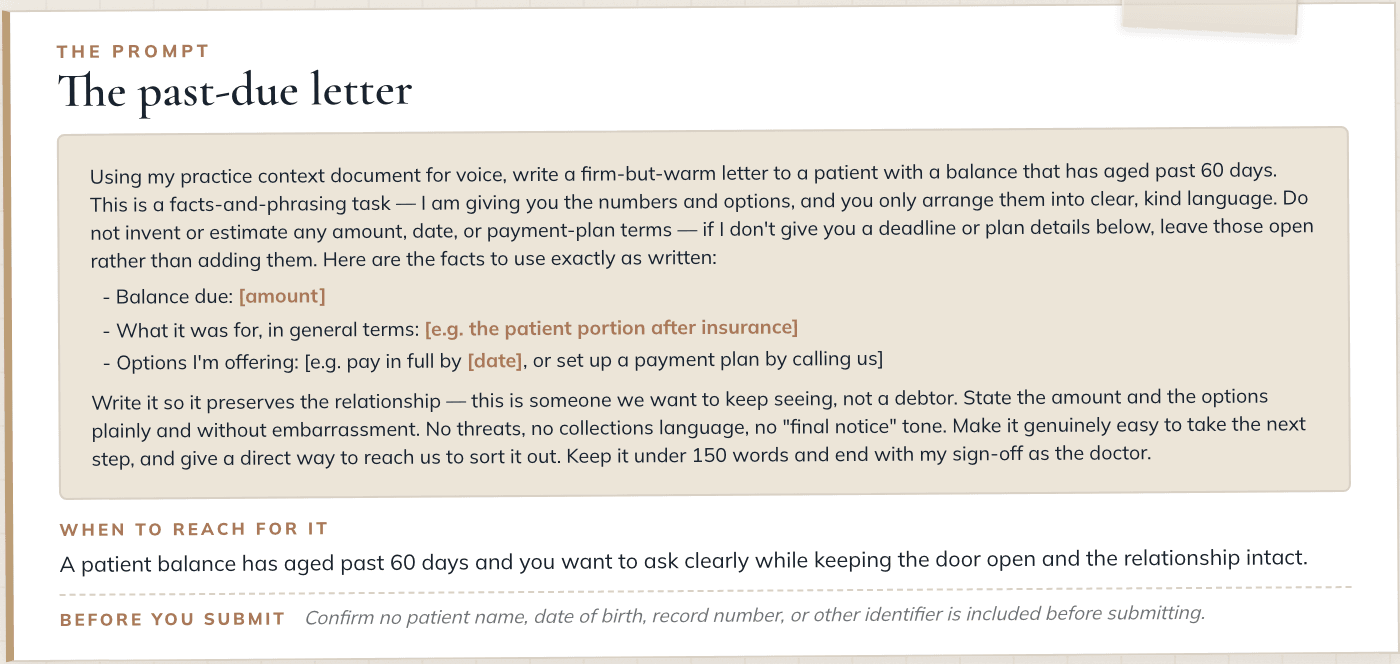
The money conversations get language to work from. A front-desk script for card-on-file that holds the policy warmly, even with a patient of ten years. A past-due letter that stays firm and kind and never slides into collections language. In each one you supply the numbers and the AI arranges them, because AI will state a number it made up with the same confidence as a real one, so the figures always come from you.
Your clinical findings turn into plain language without turning into fiction. After a comprehensive exam, the plan you have already decided on becomes something a patient can actually understand, sequenced exactly as you sequenced it, with nothing added, assumed, or improved.
The insurance writing you dread most gets a fast first draft from your own documentation. A pre-authorization narrative or a denial appeal built only from the findings you paste in, with every gap marked so you can see what still needs to be added before it goes out. Referral letters and benefit explanations, phrased cleanly from what is actually in front of you.
And the complex case that has been swimming in your head gets laid out on paper: your findings restated, your options as you framed them, your open questions gathered, and not one recommendation you didn't ask for. It arranges your thinking. It does not think for you.
Why Not Just Copy a Prompt
You might wonder why not just copy a prompt from some Claude guru on Instagram. The answer is: because it isn't yours. A shared prompt, even one that interviews you, produces something generic. It doesn't know which questions actually matter for a dentist: how you communicate under pressure, what you're protecting in the way you practice, what kind of life you're trying to build around it.
Those questions come from a decade inside clinical dentistry and years of figuring out what an AI actually needs to know about a practitioner to be genuinely useful to one. The translation of that, from who you are into something a system can learn, is 80% of why this works. The technical setup is the other 20%. Most people only ever do the 20%.
The translation of that, from who you are into something a system can learn, is 80% of why this works.
Why This Course Is Different
You have probably looked at AI training before and decided it was not built for a practice like yours. So here is plainly what this one is.
It comes from a practicing dentist who owns a practice, and the examples in it are real pieces of practice work: the patient message, the past-due letter, the pre-authorization narrative, the case that has been swimming in your head. It comes with software you install and use, two custom bots, three installable Claude skills, a Notion workspace, and a calculator that runs your own numbers. The written library is seventeen designed guides, including a US HIPAA reference, a separate Canadian privacy guide, and an imaging guide whose vendor claims were resolved against FDA 510(k) records rather than vendor marketing.
The patient-data boundary is designed into the product rather than added underneath it as a disclaimer, which is why everything in the course works on the everyday plan you already have.
And it stops on purpose. Connecting AI to your live accounts, delegating real tasks to it, automating anything: those are named, explained, and deliberately left for later, because setting them up wrong is where a practice gets into real trouble. You finish knowing where you are and what the next step is.
If you have been waiting to start until you could do it properly, without guessing about privacy and without lowering your standards, this course was built for that.
What You Leave With
By the time you're done, Claude will be configured with a context document built entirely from your own words. You'll have used it on real work from your practice: communications drafted, decisions worked through, things you've been putting off, handled. You'll have asked it a real question about your practice and watched the answer come back specific to you, not generic. And you'll leave with a safety framework and the prompting skills to keep using it confidently from that day forward.
Not theory. Real execution, on your actual practice, during the course itself.
What's Inside
Course Structure
You're Not Behind
Why the AI courses you have already bought did not stick, and the case that you are not behind. Then how to use this one: one goal and one small action per module, done in order.
Why Careful People Wait
What Claude actually is, why careful people are right to wait for clarity, and a clear look at what your lower-value tasks are quietly costing you.
The Landscape
A short orientation to the tools dentists ask about most, so you can locate yourself on the map without memorizing a curriculum.
Set It Up Right
Build the context document, in your own words, that lets Claude respond as if it knows who you are, how you practice, and what you care about.
Put It to Work
You return to a configured Claude, ask it one real question about your practice, and for the first time the answer comes back specific to you.
Momentum and Craft
A few more useful wins and a working feel for how to ask, including how to keep the answers grounded and accurate.
Stay Safe and What's Next
How to expand your use safely over time, where the patient-data boundary sits, and how to judge a new tool before you trust it.
Before You Go
What you just finished, how far a fully built system reaches in a real life and practice, and where to go next if you want to take it there.
Every guide in the library was checked against primary sources, then checked again.
What Comes With It
The context document is yours to build. The rest is reference you keep open beside the work.
The Safety Layer
The course itself never asks you for patient information. Not one example, tool, or exercise in it needs a patient's name.
Where the boundary does matter, the course is precise about it. A patient's name, date of birth, or record number never goes into a prompt. A full-face photograph is itself an identifier, whether or not a name is attached to it. Knowing where that line sits is what lets you use these tools without second-guessing every prompt.
It also teaches the difference between a Business Associate Agreement that is available and one that is executed, because a lot of practices live in that gap without knowing it. Buying the tool does not put the agreement in force. Someone on your side has to request it, accept it, or confirm it is already in your terms. So you learn the three questions to ask any vendor that could come near patient information: whether they offer a BAA and on which plan, where it activates, and whether it is in force for your account as of a date someone in your practice can name. The written references cover both sides of the border: a US HIPAA safe-harbor guide, and a separate Canadian privacy guide, because the questions a Canadian practice has to answer are not the same ones.
On radiographic AI the frame is the same steadiness. Every dental radiographic AI cleared in the United States as of July 2026 is cleared as computer-aided detection, a concurrent reader, a second set of eyes, and never an autonomous diagnosis. These tools raise detection and raise false positives at the same time, which is the defining trade-off of the whole category. The reading stays yours: the tool widens what you look at twice, and you decide what a flag actually means.
The point is confidence: you can expand what you delegate over time without wondering whether you have crossed a line you couldn't see.
Preview the Materials
The written resources read like field notes and reference tools, the kind you keep open beside the work. Here are three of the twenty prompts in the library, described the way the library itself describes when to reach for them.
The third recall attempt. When a patient is well overdue for hygiene and your usual two reminders got no response, and you want the next touch to feel human instead of nagging.
The past-due letter. When a patient balance has aged past sixty days and you want to ask clearly while keeping the door open and the relationship intact.
The complex case organizer. When a complicated case is swimming in your head and you want your own reasoning laid out cleanly before you make any clinical decision. It arranges what you already know; it never recommends.
That last one carries a boundary worth reading in full, because it is the whole philosophy of the library in a few lines:
“Do NOT propose treatment, do NOT sequence or phase care, do NOT recommend between the options… You are arranging my thinking. You are not thinking for me.”
This one is quoted in full because it is the clearest statement of what the whole library is for.
Who This Is For
This is built for practice owners who take continuing education seriously and judge a tool by whether it respects their standards. If you want AI to reduce the language and decision friction that fills your week, the drafting, the explaining, the organizing, without lowering the bar on any of it, you are who this was made for. It suits a dentist who wants clear judgment and well-built systems more than a longer list of apps.
Who It Is Not For
It is not for anyone comfortable with mediocre work. It is not for anyone who wants to hand off the decisions that matter and stop owning what happens. And it is not one more app to add to the pile. Nor is it the full executive assistant. Connecting AI to your email and calendar, building inbox triage in your voice, and standing up the operational layer of the practice is the workshop. Essentials is the foundation it stands on.

For those who want to go further and build the complete executive assistant, connected to email and calendar, running the operational layer of their practice, the workshop is the next step. This course is the door.
If you walk through it, the course stops being a separate expense. Your full course tuition applies to the workshop price for six months from the day you enroll. You are making one decision at a time, and the money you've already spent comes with you.
Common Questions
A hands-on course for dental practice owners that teaches you to configure Claude with a context document built from your own words, so AI can respond as if it actually knows your practice, your voice, and how you work.
Most AI courses cover tools and prompts. This course starts with the translation work, converting who you are and how you practice into something the AI actually learns. That setup is 80% of why the technology works at a professional level. Participants work on real practice tasks during the course, not demos.
No. The course is designed for dental practice owners, not developers. If you have used Claude or ChatGPT at all, even occasionally, you have enough background.
You will have Claude configured with a context document built from your own words. You will have used it on real work from your practice during the course. And you will have the prompting skills and a safety framework to keep using it confidently from that day forward.
No. Compliance is broader than any course, and it lives in your policies, your risk analysis, and your agreements with vendors, not in a set of prompts. What the course does teach is where the patient-data boundary sits, why an everyday AI plan belongs in the de-identified lane, and the three questions to ask any vendor before you trust it: whether they offer a Business Associate Agreement and on which plan, how it activates, and whether it is actually in force for your account as of a date you can name. That is the working knowledge that lets you make good compliance decisions. The decisions themselves stay with you and your compliance counsel.
Yes. What comes out of the prompt library is yours to use in the way you run your practice: the front-desk script belongs at the front desk, the past-due letter goes out the same way any letter does, the onboarding plan is for the person doing the onboarding. The course materials themselves stay with you, which is what the terms you accept at checkout cover. The setup work, the context document, the voice, the judgment calls, are yours to do as the owner. Once that context is in place, what comes out of it works for the whole practice.
Yes. Each module opens when you finish the one before it, because they build on each other and the early ones set you up so the later ones land. The demos are open from day one, and nothing runs on a calendar schedule, so you set the pace.
Yes. Module 2 places radiographic AI in the landscape, and the Imaging AI Field Guide goes deeper. The stance is the same one that runs through the rest of the course: the tool widens what you look at. It does not decide for you.
Your full course tuition applies to the workshop price for six months from the day you enroll. You make one decision at a time, and the money you have already spent comes with you. If you go on to the workshop within that window, the course stops being a separate expense.
Twelve months from the day you enroll. The course is maintained as a current edition for that entire window: as the tools evolve, the lessons affected are updated. One exception, named up front: the Prompt Builder carries its own six-month window.
No. The course is built the other way around. The clinical and financial prompts do not generate facts; you supply the finding, the balance, the coverage detail, and the AI arranges what you gave it into clear language. It works from what you give it and leaves the deciding to you. Radiographic AI is treated the same way, as a second reader that raises what you might look at, not a diagnosis you defer to. You still read the images and make the calls.
The course is built and taught on Claude specifically, because it is not a chatbot walkthrough, it is a persistent system: a context document that carries across sessions, a library of skills, and connectors into the actual work of running a practice. That infrastructure lives in Claude. The context document and prompt library you build are yours, plain text you could bring anywhere, but the parts that make the system keep working session to session are specific to what is taught here.
No patient health information goes into this setup. That is a separate, HIPAA-compliant build with its own requirements, and it is not what this course covers, as the compliance question above lays out. What the course does build touches the operations and business side of your practice: communications, decisions, the writing you would otherwise do at a desk. If evaluating a tool's privacy and ownership claims matters to you, it should, and that is worth doing with the same rigor you would apply to any claim a company makes about itself, including Anthropic's.